See your pages the way visitors use them.
See where visitors click, how far they scroll and what happens before they leave. Use heatmaps and recordings to decide what to make clearer.
What is heatmaps & recordings in Sextant?
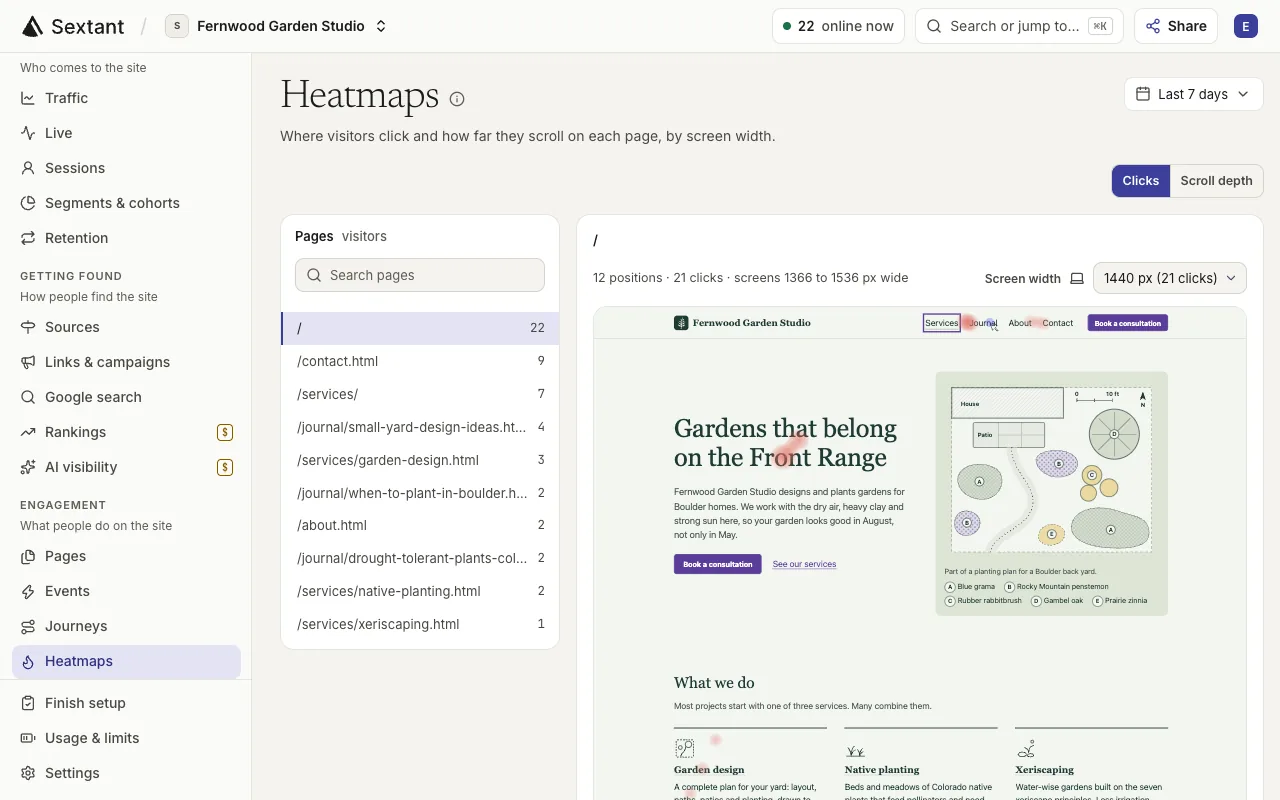
Use click and scroll heatmaps to see what visitors notice, then review recordings to investigate friction. Both are optional, with form fields hidden in recordings. Turn them on and choose a sample rate in Settings › Tracking.
“Do visitors see our booking button?”
See where visitors click and how far down they scroll on each page, for phones, tablets and computers.
- See clicks on each part of a page
- See how far down visitors scroll
- Compare phones, tablets and computers
- Ask your AI what to move or make clearer


“Why do people leave the demo form?”
Play back real visits to see what happened before someone left, with form fields hidden.
- Play back real visits, page by page
- Filter by page, device, country or segment
- Form fields are hidden in every recording
- Save up to 100 recordings for each site
What’s included
- Click heatmaps for each page
- Scroll-depth heatmaps
- Heatmaps for each screen width
- Recordings of real visits
- Form fields hidden, or all page text with strict masking
- Block any part of a page from recordings
- Sample rates for heatmaps and recordings
- Recordings kept for 30 days
- Up to 100 saved recordings per site
- Session timelines with pages and events
- Filters and segments on heatmaps and recordings
- Ask your AI to find recordings for any page
Who it helps
- Business owners & founders See where visitors get stuck on your booking or contact page, without guessing.
- In-house marketing teams Watch real visits to a campaign page before you decide what to change in the next sprint.
- Agencies & freelancers Back up each recommendation to a client with what real visitors did on their pages.
Questions about Heatmaps & recordings
No. An Admin turns them on in Settings › Tracking and chooses a sample rate, for example 15% of visits. The tracking code then loads the recorder on your pages.
No. Recordings hide form fields, and strict masking also hides all page text. Sextant rebuilds each visit from page changes, not from a video.
Pro includes 2,000 recordings a month and Enterprise includes 5,000. Extra recordings cost $5 per 1,000, only up to a limit the workspace owner sets. Recordings are kept for 30 days unless you save them.
A recording stops at the length you choose (2, 5 or 10 minutes; 5 by default) or at 5 MB of data. Visits under three seconds are left out.
Yes. Connect Sextant to Claude, ChatGPT or another AI app that supports MCP, then ask for recordings of a page or a device. It lists the matching recordings with their pages, device and length.